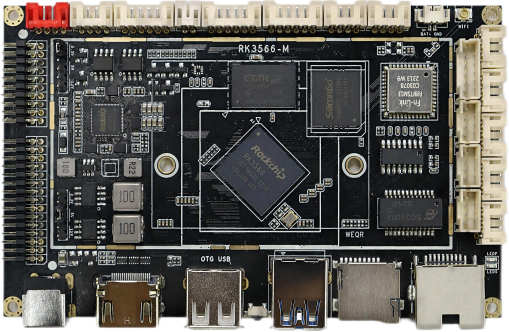
RK3566 Android decoding driver integrated board specification sheet
(Product model: RK3566-M)
Chapter one the Product Overview
1.1、 General
RK3566 Android all-in-one board adopts Rockchip's quad-core RK3566 chip solution with integrated NPU inside. RK3566 is a 64-bit CPU based on quad-core Cortex-A55 and using a new 22nm process; the main frequency is up to 1.8GHz; it supports Google Android 11.0 operating system; the GPU uses Mali G52 2EE, which supports the decoding of mainstream audio and video formats and pictures; RK3566 internally integrates an AI neural network processor NPU with a computing power of up to 1TOPS and supports a variety of AI development tools and interfaces. It is conducive to processing massive multimedia data such as videos and images, providing a strong foundation for machine deep learning; rich onboard interfaces and I/O, with rich and flexible connectivity and scalability, and support for commonly used external devices; rich interfaces and stable performance, which can meet the requirements of different scenarios;
1.2、 Characteristics
 High performance: RK3566 is a 64-bit CPU based on the quad-core A55 using a new 22nm process. The main frequency is up to 1.8GHz and has super general computing performance. The GPU uses Mali G52 2EE. The CPU integrates an AI neural network processor NPU with a computing performance of up to 1TOPS. It is conducive to processing massive multimedia data such as videos and images, and provides a strong foundation for machine deep learning.
 High stability: RK3566 Android all-in-one board adds its own unique technology to hardware and software to ensure the stability of the product, making the final product unattended 7*24 hours.
 High integration: RK3566 Android all-in-one board integrates Gigabit Ethernet, WiFi, Bluetooth, 4Ω/18W power amplifier, TF card expansion, IR remote control function, HDMI output, LVDS, eDP, MIPI screen, microphone, gravity sensor and other functions, greatly simplifying the overall machine design. The ultra-thin motherboard design can make the whole machine more beautiful.
 Rich interfaces: supports USB2.0/USB3.0 port, serial port, I2C interface, Wiegand, GPIO, ADC, etc., and can expand more peripheral devices. It can meet the common peripherals on the market, such as serial card swiping equipment, printing equipment, audio and video collection equipment, etc.
 System customization: Support Android system optimization customization, provide system call interface API reference code.
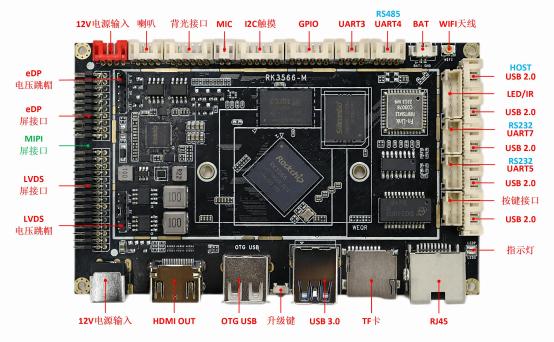
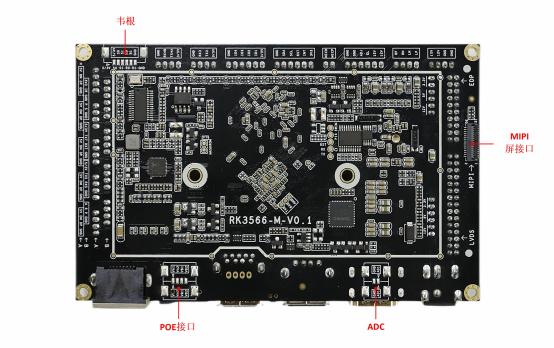
Chapter 2 Schematic Diagram of Appearance and Interface
Chapter III Basic specifications Features
3.1、 Basic Hardware Specifications Function
| CPU | Rockchip RK3566 (22nm process technology)
Quad-core 64-bit Cortex-A55 processor, running at a maximum frequency of 1.8GHz |
| GPU | ARM G52 2EE graphics processor
Supports OpenGL ES 1. 1/2 .0/3.2, OpenCL 2.0, Vulkan 1. 1
Embedded high-performance 2D acceleration hardware |
| NPU | Integrated RKNN NPU AI accelerator, 1Tops@INT8 performance
Supports one-click conversion of Caffe/TensorFlow/TFLite/ONNX/PyTorch/Keras/Darknet architecture models |
| Codec | 4K@60fps H.265/H.264/VP9 video decoding
1080P@60fps H.265/H.264 video encoding |
| Memory | 1GB/2GB/4GB/8GB LPDDR4/LPDDR4X (default 2GB) |
| Built-in storage capacity | 8GB/16GB/32GB/64GB/128GB eMMC built-in storage (default 16GB) supports TF card expansion |
| networks | Support RJ45 Gigabit network port and POE module power supply |
| Support 2.4G WiFi, support Wi-Fi 802.11b/g/n protocol |
| Support Bluetooth function, V2. 1+EDR/Bluetooth 3.0/3.0+HS/4.0 (optional) |
| Image Rotation | Supports 0 degree, 90 degree, 180 degree, 270 degree manual rotation;
Supports gravity sensing automatic screen rotation function (optional) |
| Show interfaces | 1 * eDP interface (eDP1.3, 4lanes with 10.8Gbps), supports 3.3V/5V/12V power supply
1 * LVDS interface (single/dual, 6-bit/8-bit), supports 7 "- 108" displays, supports up to
1080P 60Hz output, supports 3.3V/5V/12V power supply 1*HDMI 2.0, supports up to 4K 60Hz output
1*MIPI screen interface, supports up to 1080P 60Hz output and supports dual-screen simultaneous display |
| Audio Interface | 1 * Speaker Output (2 * 18W 4R THD < 10%) 1 * Microphone Input |
| Hardware Watchdog | Support for hardware watchdogs |
| Touch screen interface | 1 * I2C interface (supports multi-point resistive touch, multi-point capacitive touch)
Support USB multi point infrared touch, multi point capacitive touch, multi point nano film touch, multi point acoustic wave touch, multi point optical touch, etc. |
| RTC | Built-in real-time clock-powered battery, supports timing switch |
| USB | 7-way USB (5*USB-2.0 HOST, 1*USB3.0, 1*USB OTG) |
| Infrared reception | 1 * Infrared receiver, supports infrared remote control function, supports remote control boot |
| LED | 1* Power status LED (red), 1* System LED (blue, flashing by default) |
| Keystroke | 1 * Reset key, 1 * Power key, 1 * Upgrade key |
| Serial port | 5 serial ports (2*UART TTL, 2*UART RS232, 1*UART RS485) |
| IO port | 4 * IO port, support input or output |
| Wigan Interface | 1 * Input interface, 1 * Output interface |
| Recommended Power Adapter | Input: AC100-240V, 50-60Hz, Output: DC12V, 5.5mm/2. 1mm DC head 2A-5A (Requires surge voltage less than 18V, ripple voltage less than 100mV) |
3.2、 Basic software specifications Function
| OPERATING SYSTEM | Android 11 |
| Audio | MP3, WMA, WAV, ape, FLAC, AAC, OGG, M4A, 3GPP and other formats |
| Videos | Support 1080P/2160P multi-video decoding of H.265, H.264, VP8, MAV, WMV, AVS, H.263, MPEG4 and other video formats |
| Images | Supports browsing in various image formats such as JPG, BMP, PNG and supports rotation/slide play/image enlargement |
| The system comes with its own application software | APK Installer, Email, Calculator, Browser, Recorder, Calendar, Settings, Clock, Video Player, Search, Contacts, Gallery, Download, Camera, Music, Explorer |
| Language Support | many languages |
| Input method | Standard Android keyboard, built-in Google Pinyin input method
Optional third-party input method (Chinese, Korean, Japanese, etc.) |
| System Management | Native Android system, open root permissions, can be customized for product development |
| Real-time remote monitoring, system crash recovery, 7 * 24 hours unattended |
| Support OTA remote upgrade |
| Support wifi display |
| System Watchdog | Support software watchdog, support hardware watchdog |
3.3、 Work Storage Environment
| Operating ambient temperature | -25 ℃ ~ 70 ℃, -5 ℃ ~ 40 ℃ recommended |
| Working environment humidity | 10% to 90%, non-condensing |
| Storage Temperature | -30 ℃ ~ 75 ℃, it is recommended to store at room temperature |
Chapter IV PCBA Construction
4.1、 PCBA 寸法図
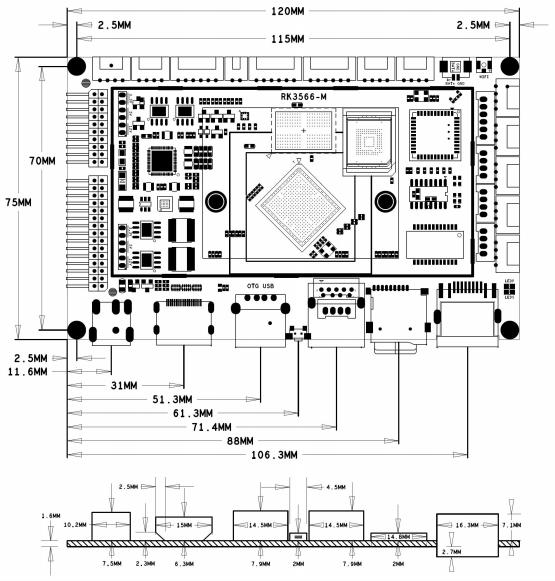
4.2、 Specification parameters
Motherboard size: 120*75* 12mm
Board height: front ≤ 8mm, back ≤ 3mm
Number of PCB layers: 8 layers
PCB size: 120*75* 1.6mm
PCB Color: Black
PCB Process: Immersion gold
Screw hole specifications: Φ2mm*4
Chapter Five Interfaces
5.1、 Interface Instructions
5.1.1、 LVDS Screen voltage cap jumper interface (6PIN/2.0)
| No. | Definition | Attribute | Description |
| 1 | 12V | Power Supply | 12V output |
| 2 | LVDS-VDD-IN | Power Supply | LVDS voltage input |
| 3 | 5V | Power Supply | 5V output |
| 4 | LVDS-VDD-IN | Power Supply | LVDS voltage input |
| 5 | 3.3V | Power Supply | 3.3V output |
| 6 | LVDS-VDD-IN | Power Supply | LVDS voltage input |
5.1.2、 LVDS Screen interface (2x15PIN/2.0)
| No. | Definition | Attribute | Description |
| 1 | POWER | Power Supply | Screen power output 3.3V/5V/12V The specific voltage is selected by the skip cap |
| 2 | POWER | Power Supply |
| 3 | POWER | Power Supply |
| 4 | GND | Earth | Earth |
| 5 | GND | Earth | Earth |
| 6 | GND | Earth | Earth |
| 7 | LVDS-A-D0N | Output | Negative data output |
| 8 | LVDS-A-D0P | Output | Data Output Positive |
| 9 | LVDS-A-D1N | Output | Negative data output |
| 10 | LVDS-A-D1P | Output | Data Output Positive |
| 11 | LVDS-A-D2N | Output | Negative data output |
| 12 | LVDS-A-D2P | Output | Data Output Positive |
| 13 | GND | Earth | Earth |
| 14 | GND | Earth | Earth |
| 15 | LVDS-A-CLKN | Output | Negative data output |
| 16 | LVDS-A-CLKP | Output | Data Output Positive |
| 17 | LVDS-A-D3N | Output | Negative data output |
| 18 | LVDS-A-D3P | Output | Data Output Positive |
| 19 | LVDS-B-D0N | Output | Negative data output |
| 20 | LVDS-B-D0P | Output | Data Output Positive |
| 21 | LVDS-B-D1N | Output | Negative data output |
| 22 | LVDS-B-D1P | Output | Data Output Positive |
| 23 | LVDS-B-D2N | Output | Negative data output |
| 24 | LVDS-B-D2P | Output | Data Output Positive |
| 25 | GND | Earth | Earth |
| 26 | GND | Earth | Earth |
| 27 | LVDS-B-CLKN | Output | Negative data output |
| 28 | LVDS-B-CLKP | Output | Data Output Positive |
| 29 | LVDS-B-D3N | Output | Negative data output |
| 30 | LVDS-B-D3P | Output | Data Output Positive |
5.1.3、 MIPI Screen interface (31PIN/0.3)
| No. | Definition | Attribute | Description |
| 1 | LED+ | Backlight power supply | Backlight Positive |
| 2 | LED+ | Backlight power supply | Backlight Positive |
| 3 | LED+ | Backlight power supply | Backlight Positive |
| 4 | GND | Earth | Earth |
| 5 | LED- | Backlit ground | Backlight Negative |
| 6 | LED- | Backlit ground | Backlight Negative |
| 7 | LED- | Backlit ground | Backlight Negative |
| 8 | LED- | Backlit ground | Backlight Negative |
| 9 | GND | Earth | Earth |
| 10 | GND | Earth | Earth |
| 11 | MiPi-D2P | Output | Data Output Positive |
| 12 | MiPi-D2N | Output | Negative data output |
| 13 | GND | Earth | Earth |
| 14 | MiPi-D1P | Output | Data Output Positive |
| 15 | MiPi-D1N | Output | Negative data output |
| 16 | GND | Earth | Earth |
| 17 | MiPi-CLKP | Output | Data Output Positive |
| 18 | MiPi-CLKN | Output | Negative data output |
| 19 | GND | Earth | Earth |
| 20 | MiPi-D0P | Output | Data Output Positive |
| 21 | MiPi-D0N | Output | Negative data output |
| 22 | GND | Earth | Earth |
| 23 | MiPi-D3P | Output | Data Output Positive |
| 24 | MiPi-D3N | Output | Negative data output |
| 25 | GND | Earth | Earth |
| 26 | NC | NC | NC |
| 27 | RESET | Output | Reset |
| 28 | NC | NC | NC |
| 29 | VDDIO1.8V | Output | VDD1.8V |
| 30 | VDD3.3V | Output | VDD3.3V |
| 31 | VDD3.3V | Output | VDD3.3V |
5.1.4、 eDP Screen interface (2x10PIN/2.0)
| No. | Definition | Attribute | Description |
| 1 | VCC | Power Supply | Screen power output 3.3V/5V/12V The specific voltage is selected by the skip cap |
| 2 | VCC | Power Supply |
| 3 | GND | Earth | Earth |
www.szbjxin.com 7
| 4 | GND | Earth | Earth |
| 5 | EDP-D0N | Output | Negative data output |
| 6 | EDP-D0P | Output | Data Output Positive |
| 7 | EDP-D1N | Output | Negative data output |
| 8 | EDP-D1P | Output | Data Output Positive |
| 9 | EDP-D2N | Output | Negative data output |
| 10 | EDP-D2P | Output | Data Output Positive |
| 11 | EDP-D3N | Output | Negative data output |
| 12 | EDP-D3P | Output | Data Output Positive |
| 13 | GND | Earth | Earth |
| 14 | GND | Earth | Earth |
| 15 | EDP-AUXN | Output | Negative data output |
| 16 | EDP-AUXP | Output | Data Output Positive |
| 17 | GND | Earth | Earth |
| 18 | GND | Earth | Earth |
| 19 | 3V3 | Output | 3.3V Power Output |
| 20 | HPD | Masukkan | HPD Test Pins |
5.1.5、 eDP Screen voltage cap jumper interface (6PIN/2.0)
| No. | Definition | Attribute | Description |
| 1 | 12V | Power Supply | 12V output |
| 2 | EDP-VDD-IN | Power Supply | EDP voltage input |
| 3 | 5V | Power Supply | 5V output |
| 4 | EDP-VDD-IN | Power Supply | EDP voltage input |
| 5 | 3.3V | Power Supply | 3.3V output |
| 6 | EDP-VDD-IN | Power Supply | EDP voltage input |
5.1.6、 Power interface (4PIN/2.0)
| No. | Definition | Attribute | Description |
| 1 | GND | Earth | Earth |
| 2 | GND | Earth | Earth |
| 3 | 12V_IN | Power Supply | 12V power supply |
| 4 | 12V_IN | Power Supply | 12V power supply |
5.1.7、 Speaker Output Interface (4PIN/2.0)
| No. | Definition | Attribute | Description |
| 1 | LP | Output | Left Channel Output Positive |
| 2 | LN | Output | Left Channel Output Negative |
| 3 | RN | Output | Right channel output negative |
| 4 | RP | Output | Right Channel Output Positive |
5.1.8、 Screen backlight interface (6PIN/2.0)
| No. | Definition | Attribute | Description |
| 1 | 12V | Power Supply | 12V output |
www.szbjxin.com 8
| 2 | 12V | Power Supply | 12V output |
| 3 | BL | Output | Backlight Enabled (5V) |
| 4 | ADJ | Output | Backlight brightness adjustment (0 ~ 5V) |
| 5 | GND | Earth | Earth |
| 6 | GND | Earth | Earth |
5.1.9、 Microphone Interface (2PIN/2.0)
| No. | Definition | Attribute | Description |
| 1 | MICP | Masukkan | Mic positive input |
| 2 | MICN | Masukkan | Mic negative input |
5.1.10、 Touch screen interface (6PIN/2.0)
| No. | Definition | Attribute | Description |
| 1 | 3.3V | Power Supply | 3.3V output |
| 2 | INT | Connectors and Input/Output | Interrupt data |
| 3 | RST | Connectors and Input/Output | Reset data |
| 4 | SCL | Connectors and Input/Output | IIC Clock |
| 5 | SDA | Connectors and Input/Output | IIC Data |
| 6 | GND | Earth | Earth |
5.1.11、 GPIO Interface6PIN/2.0)
| No. | Definition | Attribute | Description |
| 1 | 3/5V | Power Supply | 5V/3.3V(default) output |
| 2 | IO1 | Connectors and Input/Output | Default High Level |
| 3 | IO2 | Connectors and Input/Output | Default High Level |
| 4 | IO3 | Connectors and Input/Output | Default Low Level |
| 5 | IO4 | Connectors and Input/Output | Default Low Level |
| 6 | GND | Earth | Earth |
5.1.12、 UART Serial interface(4PIN/2.0)
| No. | Definition | Attribute | Description |
| 1 | 3/5V | Power Supply | 5V/3.3V(default) output |
| 2 | TX3 | Output | Send |
| 3 | RX3 | Masukkan | Receive |
| 4 | GND | Earth | Earth |
5.1.13、 UART Serial port(RS485)Interface(4PIN/2.0)
| No. | Definition | Attribute | Description |
| 1 | 3/5V | Power Supply | 5V/3.3V(default) output |
| 2 | TX4A | Output | Send/485-A (default) |
| 3 | RX4B | Masukkan | Receive/485-B (default) |
| 4 | GND | Earth | Earth |
5.1.14、 BAT Battery Interface (2PIN/1.25)
| No. | Definition | Attribute | Description |
| 1 | BAT+ | Masukkan | 3V input |
| 2 | GND | Earth | Earth |
5.1.15、 Remote Control and Indicator Interface (6PIN/2.0)
| No. | Definition | Attribute | Description |
| 1 | 3.3V | Power Supply | 3.3V output |
| 2 | IR | Masukkan | Infrared signal input |
| 3 | GND | Earth | Earth |
| 4 | P | Output | Power Indicator (Red) Light Positive |
| 5 | S | Output | System Indicator (Green) Light Positive |
| 6 | GND | Earth | Earth |
5.1.16、 UART Serial port(RS232)Interface(4PIN/2.0)
| No. | Definition | Attribute | Description |
| 1 | 5/3V | Power Supply | 5V(default)/3.3V output |
| 2 | TX7 | Output | Send |
| 3 | RX7 | Masukkan | Receive |
| 4 | GND | Earth | Earth |
5.1.17、 UART Serial port(RS232)Interface(4PIN/2.0)
| No. | Definition | Attribute | Description |
| 1 | 5/3V | Power Supply | 5V(default)/3.3V output |
| 2 | TX5 | Output | Send |
| 3 | RX5 | Masukkan | Receive |
| 4 | GND | Earth | Earth |
5.1.18、 Button interface (4PIN/2.0)
| No. | Definition | Attribute | Description |
| 1 | K | Masukkan | Upgrade Button/Volume + |
| 2 | R | Masukkan | Reset button |
| 3 | P | Masukkan | Power Button |
| 4 | GND | Earth | Earth |
5.1.19、 USB-HOST Interface4PIN/2.0)
| No. | Definition | Attribute | Description |
| 1 | 5V | Power Supply | 5V output |
| 2 | DM | Connectors and Input/Output | Data negative |
| 3 | DP | Connectors and Input/Output | Data positive |
| 4 | GND | Earth | Earth |
5.1.20、 USB-HOST Interface4PIN/2.0)
| No. | Definition | Attribute | Description |
| 1 | 5V | Power Supply | 5V output |
| 2 | DM | Connectors and Input/Output | Data negative |
| 3 | DP | Connectors and Input/Output | Data positive |
| 4 | GND | Earth | Earth |
5.1.21、 USB-HOST Interface4PIN/2.0)
| No. | Definition | Attribute | Description |
| 1 | 5V | Power Supply | 5V output |
| 2 | DM | Connectors and Input/Output | Data negative |
| 3 | DP | Connectors and Input/Output | Data positive |
| 4 | GND | Earth | Earth |
5.1.22、 USB-HOST Interface4PIN/2.0)
| No. | Definition | Attribute | Description |
| 1 | 5V | Power Supply | 5V output |
| 2 | DM | Connectors and Input/Output | Data negative |
| 3 | DP | Connectors and Input/Output | Data positive |
| 4 | GND | Earth | Earth |
5.1.23、 USB-HOST Interface4PIN/2.0)
| No. | Definition | Attribute | Description |
| 1 | 5V | Power Supply | 5V output |
| 2 | DM | Connectors and Input/Output | Data negative |
| 3 | DP | Connectors and Input/Output | Data positive |
| 4 | GND | Earth | Earth |
5.1.24、 Wigan Interface(6PIN/1.25)
| No. | Definition | Attribute | Description |
| 1 | 5/3V | Power Supply | 5V(default)/3.3V output |
| 2 | S0 | Output | Sending data |
| 3 | S1 | Output | Send Data 1 |
| 4 | R0 | Masukkan | Receiving data... |
| 5 | R1 | Masukkan | Receiving Data 1 |
| 6 | GND | Earth | Earth |
5.1.25、 ADC Conversion Interface (2PIN/1.25)
| No. | Definition | Attribute | Description |
| 1 | AD1 | Masukkan | ADC input (1.8V) |
| 2 | GND | Earth | Earth |
5.1.26、 POE Power supply interface4PIN/1.25)
| No. | Definition | Attribute | Description |
| 1 | VA1 | Output | RJ45 PIN1 & PIN2 Tap |
| 2 | VA2 | Output | RJ45 PIN3 & PIN6 Tap |
| 3 | VB1 | Output | RJ45 PIN4 & PIN5 taps |
| 4 | VB2 | Output | RJ45 PIN7 & PIN8 Tap |
5.2、 Remaining standard interfaces and features
| Name | Seat Specifications | Description |
| DC 12V power interface | DC-5.5*2.1mm female connector | 12V power input |
| HDMI connector | Standard HDMI Female | Supports up to 4K output |
| USB interface | Standard USB interface | HOST/OTG mode USB |
| Upgrade button | Non-Self-Locking Buttons | UBOOT Button |
| USB3.0 interface | Standard USB3.0 interface | HOST mode USB |
| TF card holder | Standard TF card holder | Up to 128GB |
| Ethernet interface | RJ45 connector | 10/100M/1000M adaptive Ethernet |
| WiFi antenna pedestal | IPEX- Generation 1 male | WiFi/Bluetooth antenna |
Chapter 6 Notice
Wear electrostatic protection tools such as electrostatic bracelets when ▲ touching the motherboard (good grounding is required);
▲ Do not operate live assembly, wiring, etc.;
▲ Please check the definition of the motherboard interface and the definition of the peripheral interface, and there must be no error or reverse connection.
▲ Please use M2 flat round head screws to fix the motherboard. Do not use countersunk head or larger screws. When twisting the screws, be careful to avoid deformation or bending of the motherboard;
▲ Pay attention to IO port, serial port, enable pin and other level matching;
▲ Pay attention to the power of the external screen. If the power is large, consider external power supply;
▲ Pay attention to the overall power of the product and select a power supply with sufficient power;